Modern security, networking and technology infrastructure environment

Security. IT Infrastructure. Automation. Power.

Technology systems that protect your assets and keep your business moving.

Blue Orbit Technologies helps homes, offices, schools, hospitals, retailers and industries in Kerala secure premises, maintain servers, strengthen networks, protect data, prevent downtime and modernize daily operations with dependable end-to-end IT solutions.

CCTV Servers Biometric Access Networking UPS & Solar Websites Software Automation
Established 200915+ years of field experience
One Technology PartnerSecurity, IT, power and automation
Local Kerala SupportConsultation to long-term maintenance
Business-Grade DeliveryReliable systems, clear handover

Our Clients

Trusted by respected businesses, institutions and organizations.

Blue Orbit Technologies has supported clients across dairy, sports, hospitality, retail, finance, industry, healthcare, education and commercial sectors.

Milma Kerala Cricket Association Lulu Forex Powergrid Tripenta Hotel Kalyan Motors Kairali Ayurvedic Healing Village KELL FCRI Honey Brown Govardhana Samos Toni and Guy

“Blue Orbit Technologies provided us with excellent IT and security solutions. Their professional service, reliable support and high-quality products are highly recommended.”

Milma Client feedback from organization portfolio

“Exceptional service and top-quality IT solutions. Blue Orbit Technologies greatly improved our security and networking systems with expertise and professionalism.”

Kerala Cricket Association Client feedback from organization portfolio

Why Choose Blue Orbit Technologies

A reliable technology partner for businesses that expect serious results.

Blue Orbit Technologies has built its reputation by delivering practical, dependable technology solutions for homes, offices, institutions, commercial spaces and business operations that cannot afford repeated failures.

We do not simply sell devices. We study your site, understand your requirement and deliver the right combination of CCTV, access control, servers, networking, software, firewalls, endpoint security, data backup, UPS, solar, EPABX, IP PBX, PA systems and AV infrastructure.

Our strength is accountable end-to-end execution: consultation, supply, installation, configuration, maintenance and long-term support. You do not have to coordinate CCTV from one vendor, networking from another vendor, UPS from another supplier and IT support from someone else. One experienced team can plan the complete system together, reduce blame-shifting and make future support faster.

We use branded, tested and reliable products because cheap shortcuts usually increase complaints, repeat visits, downtime and recurring expenses. A professional installation may look slightly costlier on day one, but it protects your business from poor performance, messy rework and avoidable technical failures.

Our Work Quality

Real installation quality you can inspect.

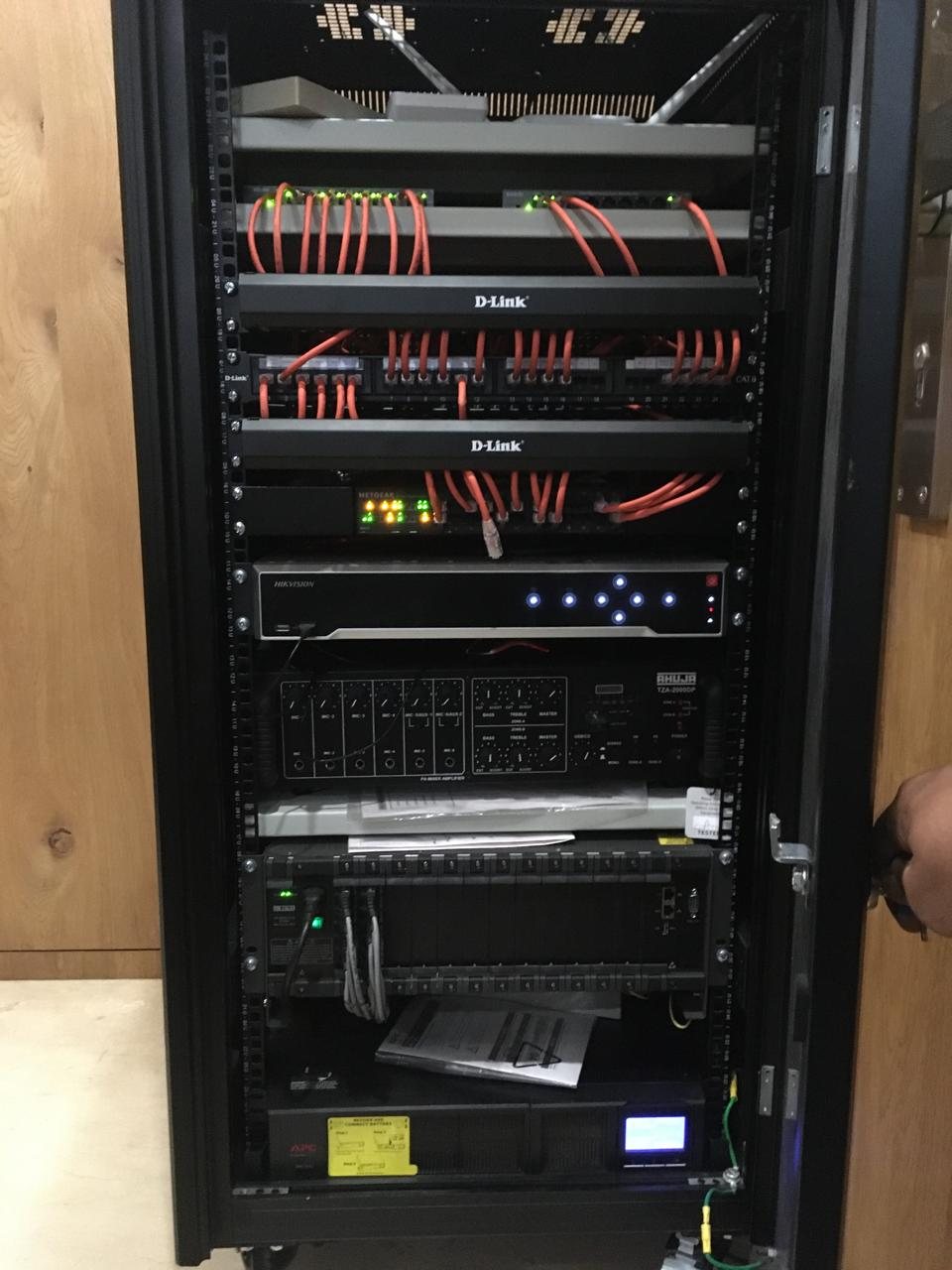
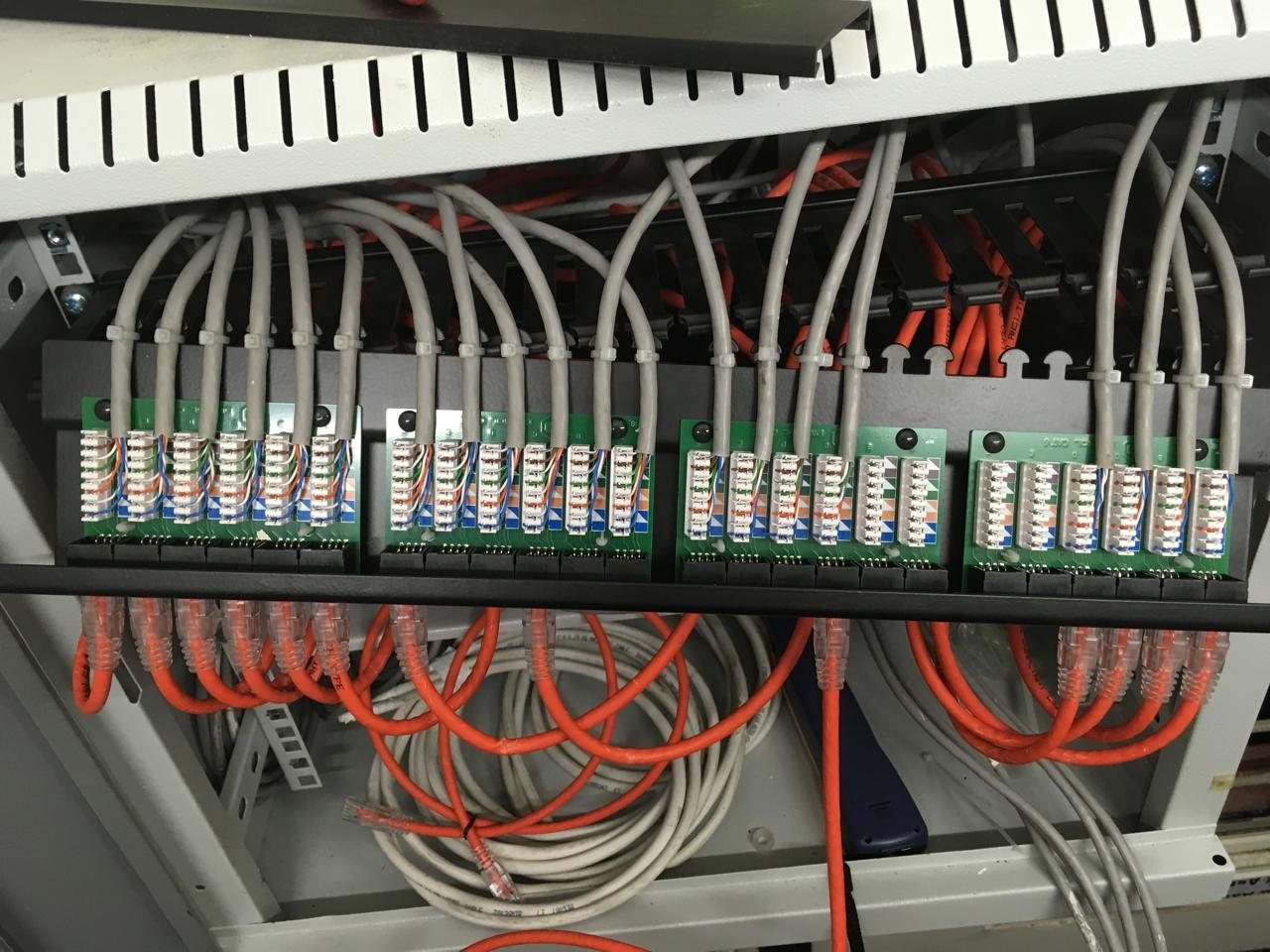
A network rack, CCTV system or access-control installation should be easy to service, clearly wired, properly protected and built with reliable products. These project photos show the kind of finishing, organization and camera-performance checks customers should expect.

Actual 23U network rack installation by Blue Orbit Technologies
Actual rack installation Rack-mounted equipment, controlled cabling and serviceable layout.
Structured network patch panel and organized rack cabling
Structured patching Label-friendly cabling that reduces future troubleshooting time.
CCTV view comparison with and without digital wide dynamic range
CCTV DWR comparison Camera settings and placement matter when light conditions are difficult.

Core Services

Security, infrastructure and automation services delivered with serious technical care.

From first survey to final support, every solution is planned around your location, risk, budget, uptime needs and long-term maintenance.

Access

Biometric & Access Control Systems

Fingerprint, face recognition, card, keypad and door access systems for attendance, restricted rooms, staff entry control and high-security zones.

  • Attendance and entry management
  • Door locks, readers and access controllers
  • Office, institution and facility integration
Explore access systems
Network

Networking, Wi-Fi & Structured Cabling

Stable networks for teams, CCTV, billing systems, barcode devices, EPABX/IP PBX, NAS systems and business applications.

  • LAN, Wi-Fi, routers, switches and firewalls
  • Routers, network products, cables and connectors
  • EPABX, IP PBX, NAS drives and network storage
Explore networking
IT Support

Managed IT, Servers & Data Backup

Practical IT support for businesses that need computers, laptops, servers, software, storage, backup, printers and daily operations to run without repeated interruptions.

  • Server maintenance and performance checks
  • Managed IT services, IT consultation and software
  • Computers, laptops, peripherals, printers and barcode systems
Explore IT support
Digital Presence

Website Design & Business Email Setup

Premium business websites, landing pages, domain setup, hosting, SSL, professional email, Google Search Console and basic SEO setup for companies that want to look credible online.

  • Static business websites and service pages
  • Domain, hosting, SSL and email configuration
  • Google indexing, sitemap and enquiry forms
Explore web design
Software

Software Development & Business Tools

Practical software support for businesses that need simpler workflows, better data handling, barcode-based operations, reports, forms and internal tools.

  • Business applications and workflow tools
  • Barcode, inventory and reporting support
  • Website maintenance and digital upgrades
Explore software services
Power

UPS, Inverters & Solar Solutions

Power backup and energy solutions that protect CCTV, servers, network equipment, billing counters, office systems and essential devices from downtime.

  • Offline UPS, online UPS, inverter and battery planning
  • Surge protection for critical equipment
  • On-grid and off-grid solar options
Explore power solutions
Smart Spaces

Automation, PA, EPABX, IP PBX & AV Systems

Automation and communication systems that make homes, offices, institutions and meeting spaces easier to manage, present, announce and control.

  • Home automation and automated/automatic gates
  • PA systems, EPABX, IP PBX and communication setup
  • Projectors, screens and AV integration
Explore automation & AV

Complete Service Catalog

Everything your site needs, from security and networks to power, automation and IT products.

Blue Orbit Technologies brings multiple critical systems under one accountable team, so your project is easier to plan, easier to install and easier to maintain.

Security & Access
  • CCTV Installation
  • CCTV Accessories
  • Attendance Systems
  • Biometric Access Control Systems
  • Firewalls
  • Endpoint Security
IT Infrastructure
  • Server Maintenance
  • Managed IT Services
  • IT Consultation
  • Software
  • Data Backup Services
  • NAS Drives & Systems
Websites & Software
  • Business Website Design
  • Landing Pages
  • Domain, Hosting & SSL Setup
  • Professional Email Setup
  • Google Search Console & Basic SEO
  • Software Development & Business Tools
Networking & Communication
  • Networking
  • Wi-Fi Solutions
  • Routers & Network Products
  • Cables & Connectors
  • EPABX & IP PBX
  • PA System
Power & Automation
  • Offline & Online UPS
  • Inverters
  • Solar On Grid & Off Grid
  • Home Automation
  • Automated/Automatic Gates
  • Projectors and Screens
Sales & Service
  • Computers & Laptops Sale & Service
  • Computer Peripherals
  • Printers
  • Barcode Printers
  • Barcode Scanners
  • Routers, cables and IT accessories

Solution Bundles

Make buying easier with ready-to-understand packages.

Customers often do not know exactly what to ask for. These solution bundles frame your services around the real business outcomes they want.

01

Secure Office Package

CCTV, biometric attendance, access control, Wi-Fi, network points, UPS backup and support for offices and commercial units.

Indicative starter setup from Rs. 25,000*
02

Smart Institution Package

Surveillance, PA systems, networking, projectors, access control and IT support for schools, colleges, clinics and training centres.

Site survey recommended for accurate estimate
03

Business Continuity Package

Server maintenance, backup, UPS, solar planning, network security and managed support for businesses that cannot afford downtime.

Monthly support plans available after assessment

*Final pricing depends on camera count, cabling distance, brand selection, backup runtime, site condition and support scope. A site visit gives the most accurate estimate.

Who We Serve

Technology solutions for different environments.

Homes & ApartmentsCCTV, smart home, access, Wi-Fi and inverter backup.
Retail & ShowroomsSurveillance, POS support, networking and customer-facing AV.
Offices & EnterprisesBiometrics, servers, LAN, Wi-Fi, backup and managed IT.
Schools & InstitutionsCampus CCTV, PA systems, projectors, networking and support.
Hospitals & ClinicsReliable networks, security, backup power and communication systems.
Industrial SitesSurveillance, access control, power backup and structured infrastructure.

Knowledge Base

Network Security & Infrastructure Awareness Series.

Five professional, long-form guides for business owners, schools, hospitals, offices and institutions that want to understand networking, security, CCTV, servers and IT infrastructure before investing.

01 Why Network Infrastructure is the Backbone of Every Modern Business

A practical guide for business owners, schools, hospitals, offices and institutions that depend on stable connectivity.

In today's business environment, network infrastructure is no longer a hidden technical layer that only IT people need to understand. It is the foundation that carries communication, data, security, surveillance, billing, cloud applications and daily productivity. A retail shop depends on its billing system and barcode devices. A hospital depends on patient records, laboratory systems, Wi-Fi and secure data access. A school depends on online learning, smart classrooms, CCTV, attendance systems and administrative software. An office depends on email, file sharing, printers, servers, internet access and collaboration platforms. When the network is weak, all these activities become slow, unreliable or unavailable.

Network infrastructure includes routers, switches, firewalls, servers, access points, network racks, structured cabling, fiber links, NAS storage, monitoring systems and the software configurations that allow these devices to work together. Many customers see only the internet connection and Wi-Fi password, but the real performance comes from the design behind it. A professional network is planned around user count, device load, security requirements, building layout, future expansion and business continuity. Without this planning, even expensive internet plans and branded devices may not deliver reliable performance.

Business continuity is one of the strongest reasons to invest in proper network infrastructure. If the network fails, billing counters stop, staff cannot access files, CCTV remote viewing may fail, VoIP calls may drop, cloud applications may become unusable and customers may experience delays. For many organizations, one hour of network downtime can cost more than the price difference between a cheap installation and a professional one. Proper switches, backup power, cable management, firewall rules and documentation help reduce these interruptions.

Security is another major concern. Cybercriminals do not target only large corporations. Small and medium businesses, schools, clinics, hotels and local offices are often easier targets because their networks are not properly secured. Weak passwords, outdated routers, open Wi-Fi, unmanaged switches, flat networks and missing firewalls can expose sensitive information. A well-designed network includes firewalls, VLAN segmentation, endpoint protection, user access control, secure remote access and regular updates. These practices reduce the chance of ransomware, data theft and unauthorized access.

Scalability should be considered from the beginning. Many organizations start with a few computers and later add CCTV cameras, biometric devices, printers, servers, IP phones, access points, NAS storage and cloud services. If the original cabling and switching are not planned for growth, the business ends up with messy extensions, slow performance and repeated rework. A future-ready network allows additional users and devices without starting from zero. It also keeps the installation neat and easier to maintain.

Reliability affects reputation. Customers may not know the reason behind a technical failure, but they remember poor service. A hotel with slow Wi-Fi, a clinic with delayed billing, a school with failing smart classroom connectivity or a showroom where payment systems keep disconnecting will lose trust. Network reliability is therefore not only an IT issue; it is a customer experience issue. Quality equipment, proper installation, backup power and preventive maintenance protect the professional image of the organization.

Cloud applications have made network quality even more important. Microsoft 365, Google Workspace, accounting platforms, ERP systems, CRM tools, video conferencing and online backup all depend on stable internet and internal connectivity. If the network has bottlenecks, employees may blame the software or internet provider, while the actual issue may be poor Wi-Fi placement, weak switching, overloaded routers or bad cabling. Professional assessment helps identify the real cause instead of guessing.

Modern networks also support CCTV, access control, biometric attendance, PA systems, IP PBX, NAS systems and smart building devices. These systems should not be randomly connected without planning. CCTV traffic can affect office users if not separated properly. Guest Wi-Fi should not have access to business systems. Access control devices should remain stable even during peak network usage. Integrating these systems through proper network design improves performance, security and manageability.

Documentation is a major sign of professional work. Every business should know where its network points are, which switch serves which area, what IP ranges are used, where the firewall is located, which devices are critical and who has administrative access. Without documentation, troubleshooting becomes slow and expensive. When a technician has to trace every cable from the beginning, the business loses time. Clear documentation helps future upgrades and faster support.

Power protection is closely connected to network infrastructure. Routers, switches, firewalls, servers, CCTV recorders and access points should be protected by UPS where needed. A network that fails during every power interruption cannot be called reliable. UPS sizing should be based on actual load and required runtime. Surge protection and proper grounding also protect valuable equipment from damage.

A professional network should be treated as a long-term investment rather than an expense. Cheap installations may look attractive at first, but hidden costs appear later through downtime, repeated troubleshooting, poor speed, security incidents and replacement work. Investing in proper network planning gives better uptime, stronger security, easier expansion and lower stress. It also helps the business use future technologies more confidently.

In conclusion, network infrastructure is the backbone of modern operations because nearly every digital system depends on it. Businesses that plan their networks properly are better prepared for growth, cyber threats, cloud adoption, CCTV expansion and daily operational demands. Blue Orbit Technologies helps customers build practical, secure and reliable network foundations that support the way their sites actually work.

Before approving a network quotation, ask for the cabling standard, switch capacity, Wi-Fi design, firewall approach, backup power plan and documentation. These details reveal whether the proposal is built for long-term reliability or only for the lowest first-day cost.

Quick action checklist

  • Assess users, devices, applications and growth before installation.
  • Plan switching, cabling, Wi-Fi, firewall and backup power together.
  • Document the network so future support and upgrades are easier.
02 The Cost of Poor Network Design: Hidden Risks Every Business Should Know

Why cutting corners in cabling, switching, Wi-Fi and security often becomes more expensive later.

Poor network design rarely announces itself on the first day. The internet may work, a few computers may connect and Wi-Fi may show full signal near the router. Because of this, many organizations believe the job is complete. The real problems usually appear later, when more users join, CCTV cameras are added, cloud applications become important, or the business experiences its first serious outage. At that point, the hidden cost of poor design becomes clear.

One common mistake is buying low-quality networking equipment only to reduce initial cost. Cheap routers, switches and access points may lack stability, security features, firmware support and proper load handling. They may restart randomly, slow down under traffic or fail during power fluctuation. The money saved during purchase is then spent on troubleshooting, emergency replacement and lost productivity. For a business, reliability is more valuable than the lowest device price.

Improper cabling is another silent risk. Poorly crimped cables, low-grade cable material, sharp bends, exposed outdoor runs, unlabeled network points and messy routing can cause intermittent issues that are difficult to diagnose. A cable may work during testing but fail under load or after physical movement. Structured cabling should be installed neatly, tested properly and documented. Without this discipline, the network becomes unpredictable.

Lack of network segmentation creates serious security exposure. In many small businesses, guest Wi-Fi, CCTV, billing systems, office computers, printers and servers all sit on the same network. If one device is compromised, it may expose everything else. Proper VLAN segmentation and firewall rules help isolate sensitive systems. Guest users should not be able to reach servers. CCTV systems should not freely communicate with all office computers. Segmentation reduces the damage caused by one weak device.

Bandwidth planning is often ignored. Today, even small offices use cloud storage, video meetings, IP surveillance, online billing, software updates and remote support. If all traffic passes through weak equipment, users experience slow performance and unstable connections. The internet plan may be blamed, but the real issue could be internal bottlenecks. Professional design considers both internet bandwidth and internal network capacity.

Wireless design needs more than placing a router in the middle of the office. Walls, floors, glass, metal, electrical interference and user density affect Wi-Fi quality. Many sites install random repeaters, which often create unstable roaming and speed loss. Proper access point placement, channel planning and cabling produce better results. Good Wi-Fi should be designed based on where people work, not where power sockets are convenient.

Poor documentation increases every future support cost. If no one knows which cable goes where, which switch serves which floor or what IP address is assigned to each device, troubleshooting becomes slow. Technicians spend time discovering the network instead of fixing the problem. Documentation should include diagrams, IP plans, device locations, usernames, warranty details and service history. This is especially important for schools, hospitals, offices and multi-floor buildings.

Security vulnerabilities often come from default configurations. Routers may keep default passwords, remote access may be open, firmware may be outdated and unnecessary ports may remain exposed. These issues are common when installation is rushed. Attackers look for easy entry points. A professional setup includes password changes, firmware updates, firewall rules, user access control and regular security review.

Power protection is another overlooked area. Network devices are sensitive to voltage fluctuation and sudden outages. Without UPS and surge protection, switches, routers, firewalls and servers may fail or corrupt data. During a power cut, CCTV recording, internet access and communication systems may stop exactly when they are needed. UPS planning should cover critical devices, not just computers.

Rack organization also matters. A tangled rack with loose adapters, hanging cables and unlabeled devices creates risk. Someone may accidentally disconnect the wrong cable. Heat may build up around devices. Troubleshooting becomes slow and unprofessional. A proper rack uses patch panels, cable managers, adequate ventilation, PDU, UPS and clear labeling. It reflects the seriousness of the organization.

The financial impact of poor design is often larger than expected. Downtime affects staff productivity, billing, customer service, management reporting and security. Emergency repairs cost more than planned maintenance. Rework costs more than doing the job correctly once. A network failure during a busy business day can damage customer confidence and staff morale. These losses are rarely shown in the original quotation comparison.

The better approach is to treat network design as a foundation. The business should ask whether the solution is secure, scalable, documented, serviceable and protected against power issues. Blue Orbit Technologies focuses on practical design because a network must support real operations, not only pass a basic connectivity test. A properly designed network reduces hidden risks and gives the business a stable platform for future growth.

The warning sign is not always immediate failure. Poor network design usually shows up later as slow billing, unstable Wi-Fi, missing CCTV playback, recurring support visits and confusion during expansion. A clear scope and documented design reduce those hidden costs.

Quick action checklist

  • Avoid choosing networking equipment only by lowest price.
  • Insist on labeled cabling, rack organization and documentation.
  • Separate guest, CCTV, server and business networks where needed.
03 Essential Components Every Professional Network Rack Should Contain

A clear explanation of what belongs inside a well-planned rack for offices, schools, hospitals and commercial sites.

A network rack is the central point where the technology infrastructure of a site becomes organized and manageable. In many places, routers, switches, cables and adapters are left on tables, shelves or ceiling corners. This may work temporarily, but it becomes difficult to maintain as the site grows. A professional rack protects equipment, improves airflow, simplifies troubleshooting and creates a clean foundation for future expansion.

The first component is the rack cabinet itself. Rack size should be selected based on current equipment and future needs. A small wall-mounted rack may be enough for a small office, while a larger floor-standing rack may be needed for schools, hospitals, hotels or multi-floor commercial buildings. The rack should have proper ventilation, lockable doors, cable entry options and enough depth for switches, UPS units and patch panels.

Patch panels are essential for structured cabling. Instead of plugging long building cables directly into switches, cables are terminated neatly on a patch panel. Short patch cords then connect the panel to switches. This makes maintenance cleaner and reduces stress on cable ends. When a network point needs to be changed, the technician can manage it from the rack without disturbing permanent cabling.

Cable managers keep the rack neat. Horizontal and vertical cable managers guide patch cords and prevent tangling. Without cable management, racks quickly become messy, especially when CCTV, Wi-Fi, access control, printers and office systems are added over time. Clean cabling is not only about appearance; it reduces mistakes, improves airflow and saves time during support.

Core switches and access switches are the heart of the rack. Switch capacity should be selected based on number of users, network points, cameras, access points and future expansion. PoE switches are especially important for IP cameras, wireless access points and IP phones because they provide both data and power through network cable. Choosing the right PoE budget prevents unstable devices.

Routers and firewalls must be placed and configured carefully. A router connects the site to the internet, while a firewall protects and controls traffic. In professional environments, a firewall is often more important than a basic router because it can support security rules, VPN access, filtering, VLANs and monitoring. Businesses that depend on cloud applications, remote access or sensitive data should not ignore firewall planning.

Servers and NAS storage may also be housed in or near the rack. A server supports business applications, files, authentication or specialized software. NAS storage can centralize files and backup data. These devices need stable network connectivity, backup power and proper ventilation. They should not be placed randomly in dusty or insecure areas.

Fiber LIU units, SFP modules and fiber patching become important in larger sites or multi-building campuses. Fiber links provide high-speed connectivity over longer distances and reduce issues caused by electrical interference. Schools, hospitals, factories and large offices may use fiber backbone connections between floors or buildings. Proper termination and labeling are essential for reliable fiber infrastructure.

A PDU, or power distribution unit, organizes power inside the rack. Instead of using random extension boards, a PDU provides safer and cleaner power distribution for routers, switches, firewalls and other devices. It should be paired with proper earthing and surge protection. Good power organization reduces accidental unplugging and improves serviceability.

UPS backup is critical. Network racks often contain the devices that keep the whole site connected. If the rack loses power, internet, Wi-Fi, CCTV, servers and IP phones may all stop. UPS sizing should be based on total load and required runtime. Battery health should be checked periodically. For important sites, backup power planning should also consider generator or inverter integration.

Environmental monitoring may be useful for larger racks. Temperature, humidity, smoke, water leakage and door access monitoring can protect critical infrastructure. Heat is a silent enemy of network equipment. Poor ventilation can shorten device life and cause random failures. Even a simple fan and clean rack placement can improve reliability.

Labeling and documentation complete the professional rack. Every cable, patch panel port, switch port, device and power connection should be labeled clearly. A rack diagram should show how devices connect. This makes troubleshooting faster and supports future upgrades. Blue Orbit Technologies recommends rack planning as part of serious infrastructure work because a clean rack is a sign of a maintainable network.

When comparing rack quotations, look beyond the rack size. Ask whether patch panels, cable managers, labeling, PDU, UPS, ventilation and documentation are included. These items decide whether the rack remains serviceable after six months of real use.

Quick action checklist

  • Use patch panels, cable managers and proper rack sizing.
  • Plan PoE switches, firewalls, UPS and PDU together.
  • Label every cable, port and device for faster support.
04 Network Security Best Practices for Small and Medium Businesses

A practical cyber security guide for businesses that need more than antivirus protection.

Small and medium businesses often believe cyber security is a concern only for large companies. In reality, smaller organizations are frequently targeted because their protection is weaker, their staff may be less trained and their backups may not be tested. A cyber incident can stop billing, expose customer information, damage reputation and create financial loss. Network security should therefore be treated as a basic business requirement.

The firewall is the first major layer of defense. A business-grade firewall controls traffic between the internet and internal systems. It can block unwanted access, separate networks, support VPN connections, filter websites and provide security logs. A basic internet router is not enough for many businesses. Firewalls should be configured according to the site, not left with default settings.

Network segmentation reduces damage. If all devices are on one flat network, a compromised laptop may reach servers, CCTV, printers and billing systems. VLANs and firewall rules can separate guest Wi-Fi, office computers, CCTV, servers and management systems. This approach limits movement inside the network and makes the environment safer.

Guest Wi-Fi isolation is essential. Customers, visitors and temporary users should not share the same network as internal systems. A guest network should provide internet access only, with no access to printers, servers, CCTV or business software. This is especially important for hotels, clinics, offices, schools and retail spaces where visitors frequently request Wi-Fi.

Strong password policies are simple but powerful. Every business should avoid shared passwords, default passwords and reused passwords. Administrator accounts should be limited. Passwords must be changed when staff leave or vendors no longer require access. Critical systems such as email, firewall, CCTV, NAS and business software should have unique credentials.

Multi-factor authentication adds another layer of protection. Business email is especially important because attackers can use email access to reset other passwords, send fake invoices or steal sensitive communication. MFA should be enabled for email, cloud storage, remote access, financial accounts and administrator portals wherever possible.

Endpoint security protects computers and laptops. Antivirus alone may not be enough against modern threats. Endpoint protection should include real-time scanning, behavior monitoring, web protection and update management. Devices used by staff should not be ignored because one infected system can affect the wider network.

Backup strategy is part of security. Ransomware attacks often succeed because businesses have no clean backup. The 3-2-1 rule is a practical model: keep three copies of data, on two types of storage, with one copy away from the main system. Backups should be protected from accidental deletion and tested regularly.

Email security and staff awareness are critical. Many attacks begin with fake invoices, courier messages, bank alerts, job applications or login warnings. Staff should learn to check sender addresses, avoid unexpected attachments and verify payment changes by phone. Awareness training does not need to be complicated; it needs to be repeated and practical.

Monitoring and logging help detect problems early. Firewalls, servers, NAS devices and endpoint systems can generate useful logs. Reviewing these logs may reveal repeated login failures, unknown devices, blocked threats or unusual traffic. Small businesses may not need enterprise-level monitoring, but they should at least know what normal activity looks like.

Incident response planning prepares the business for the day something goes wrong. Who disconnects an infected computer? Who calls the IT provider? Where are backups stored? Who informs management? What systems are restored first? These answers should be decided before an emergency. Confusion during an incident increases damage.

Network security is not a one-time installation. It is a continuous practice of updates, review, staff awareness, backups, access control and maintenance. Blue Orbit Technologies helps customers build practical security layers that match their size and risk. The goal is not fear; the goal is confidence, continuity and responsible protection of business systems.

Security should be practical enough for staff to follow every day. Strong passwords, MFA, guest Wi-Fi separation, endpoint protection, tested backups and controlled administrator access do more for most small businesses than complicated tools that nobody maintains.

Quick action checklist

  • Use firewall, VLANs, endpoint protection and MFA together.
  • Train staff to recognize phishing and payment fraud.
  • Maintain tested backups and a basic incident response plan.
05 Building a Future-Ready Network: Planning for Growth, Cloud, CCTV and AI

How modern businesses should design networks for the next five to ten years, not only for today.

A future-ready network is designed with growth in mind. Many organizations install technology only for current needs and later struggle when they add more users, cameras, access points, cloud applications, servers or smart devices. Repeated patchwork makes the network messy and unreliable. A better approach is to plan infrastructure that can support the next five to ten years of business change.

Structured cabling is the foundation. Quality copper cabling, proper termination, patch panels, labeling and testing create a stable base. If cabling is weak, every connected system suffers. Offices, schools, hospitals, hotels and factories should plan network points based on desks, cameras, access points, printers, biometric devices, meeting rooms and future expansion areas. Empty conduits and spare points can save major rework later.

Fiber backbone planning is important for larger buildings and campuses. Fiber supports high-speed links between floors, blocks and racks. It is useful for CCTV-heavy sites, institutions, factories and commercial buildings where data must travel longer distances. Planning fiber early allows future bandwidth growth without replacing everything.

Wi-Fi 6 and Wi-Fi 6E planning should consider density, not only coverage. Modern users carry laptops, phones, tablets and IoT devices. Conference rooms, classrooms, hotels and waiting areas may have many devices in one space. Access points should be selected and placed based on user load, interference and roaming needs. A future-ready wireless design avoids dependence on random repeaters.

Cloud applications are now central to business operations. Email, file storage, accounting, CRM, ERP, video meetings and backup may all depend on cloud connectivity. The network should support stable internet, firewall rules, bandwidth management and backup internet options where needed. Cloud performance depends heavily on local network quality.

Hybrid work has changed network requirements. Staff may need secure access from outside the office. VPN, remote desktop, cloud identity and multi-factor authentication should be planned carefully. Remote access should not mean opening unsafe ports or sharing passwords. A future-ready network supports controlled access without exposing the business unnecessarily.

IP surveillance systems require proper bandwidth and storage planning. High-resolution cameras create continuous traffic. If CCTV is added without considering switching capacity, PoE budget, storage, VLANs and UPS backup, it can affect office users. CCTV should be integrated into the network professionally, with clear separation and reliable recording.

Access control, biometric attendance and IoT devices are becoming common in commercial spaces. These devices may look small, but they add network traffic, security requirements and maintenance needs. Each device should be documented, assigned properly and protected from unauthorized access. Future-ready design considers these systems from the beginning.

AI-powered analytics and smart monitoring will increase data demand. CCTV analytics, people counting, license plate recognition, environmental monitoring and predictive maintenance may become useful for many businesses. These systems require reliable connectivity, processing power, storage and security. A weak network will limit adoption of these technologies.

Redundancy improves continuity. Important sites may need backup internet, spare switch capacity, UPS protection, secondary links or failover planning. Not every small business needs enterprise-level redundancy, but every organization should understand which systems are critical and what happens if they fail. Planning this early reduces panic later.

Cybersecurity must be integrated into future planning. More devices mean more possible entry points. Firewalls, endpoint protection, VLANs, strong passwords, MFA, updates and monitoring should grow with the network. Security should not be added after an incident; it should be built into the design.

A future-ready network is not about buying the most expensive equipment. It is about making decisions that support growth, reliability and security. Blue Orbit Technologies helps customers plan infrastructure that fits current requirements while leaving room for tomorrow. The result is a cleaner installation, fewer surprises and a technology foundation ready for business expansion.

A future-ready network leaves room for more users, cameras, access points, cloud applications and storage without messy rework. The best time to plan expansion is before the ceiling is closed, the rack is full and every spare port is already used.

Quick action checklist

  • Plan cabling, fiber, Wi-Fi, CCTV and cloud use together.
  • Leave room for more users, cameras, devices and bandwidth.
  • Build cybersecurity and business continuity into the design from the start.

How We Work

A professional process that protects your time and money.

1Survey

We understand your location, risks, existing systems, budget and practical constraints.

2Plan

We recommend the right products, layout, capacity, cabling and maintenance approach.

3Deploy

We install, configure, test and hand over the system with clear usage guidance.

4Support

We help with service, upgrades, troubleshooting, backup and long-term reliability.

Our Team

One accountable team for planning, installation, digital work and long-term support.

Blue Orbit Technologies™ works as a coordinated technical team, not as disconnected vendors. From site survey and product selection to cabling, configuration, website updates, documentation and support, every project is handled with clear responsibility and practical field experience.

BOT

Project Consultation

Requirement study, site inspection, solution planning, product selection, budget guidance and customer coordination before work begins.

IT

Technical Installation

CCTV, networking, Wi-Fi, rack dressing, UPS, access control, PA systems, automation and hardware installation with clean execution.

SYS

Systems Configuration

DVR/NVR setup, remote viewing, firewall rules, network devices, NAS, backup routines, biometric software and business system readiness.

WEB

Web & Software Support

Website updates, digital presence setup, business email support, software coordination, forms, content changes and practical online improvements.

SUP

Service & Support

Fault diagnosis, maintenance visits, upgrades, documentation, user guidance and practical support when your business needs help quickly.

FAQ

Questions customers ask before choosing a technology partner.

Do you provide CCTV installation for homes and businesses?

Yes. Blue Orbit Technologies provides CCTV system planning, camera placement, installation, DVR/NVR setup, remote viewing and maintenance for residential, commercial and industrial premises.

Can you handle both networking and security systems together?

Yes. We can combine CCTV, access control, Wi-Fi, LAN, structured cabling, network hardware, backup power and IT support into one coordinated solution.

Do you provide support after installation?

Yes. We provide ongoing maintenance, troubleshooting, upgrades and technical support depending on the system and service plan.

Where are you located?

Blue Orbit Technologies is located at 17/1091, 1st Floor, Prabath Complex, College Road, Palakkad, Kerala - 678001.

Blog & Insights

Fresh technology articles that can bring search traffic over time.

Publishing helpful articles regularly will improve trust, answer customer questions and create more chances to appear in Google searches.

Security

Modern CCTV features every business owner should ask for

Remote viewing, storage planning, night vision, motion alerts and camera placement explained in simple language.

Read more
Networking

Why slow office Wi-Fi is usually a planning problem

Routers, access points, cabling, interference and user load all affect performance. A proper survey prevents repeat issues.

Read more
Power

How UPS backup protects CCTV, servers and billing counters

Power protection is not only about outages. It protects recording, data, network continuity and customer service.

Read more

Get a quote

Ready to secure, connect or upgrade your site?

Call Blue Orbit Technologies or send your requirement. We will help you choose the right solution for your premises, budget and business goal.

Download Portfolio PDF
WhatsApp Us